
Manifest
INSTRUMENT DATASHEET — EVERY INPUT, MADE VISIBLE
01 Function
See your inputs as they happen.
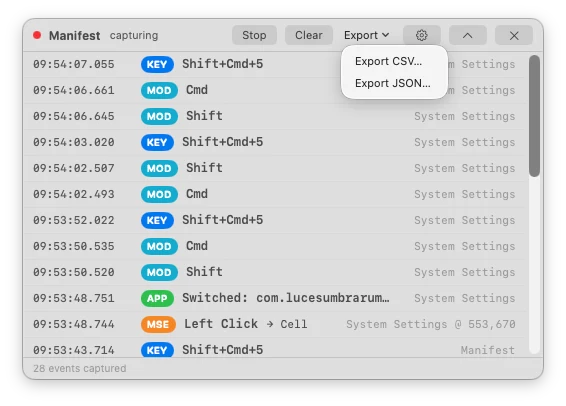
Keystrokes, clicks, scrolling and app switches in a floating panel, for demos and debugging.
Event context
Each event includes the frontmost app and local and UTC timestamps. Clicks can include the control’s role and title.
Panel placement
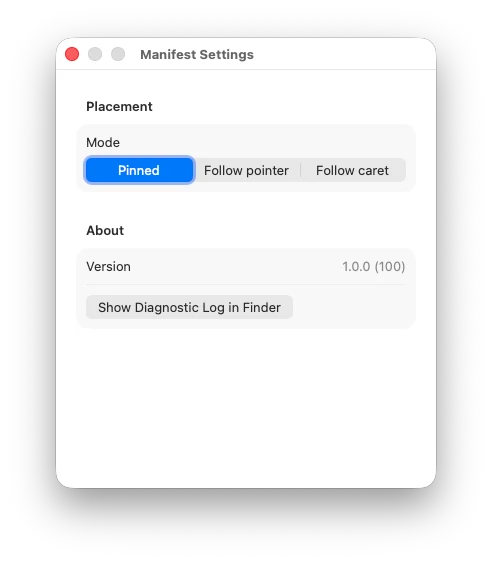
Pin the panel, follow the pointer or follow the text cursor. Compact mode shows the latest event.
Export
Save a session as CSV or JSON.
02 Views

03 Specifications
| Requirements | macOS 15.0 or later. Accessibility and Input Monitoring permission (one-time grant each). |
| Runs as an agent | No Dock icon, no menu bar item. The HUD floats above your windows — quit it with the × on the expanded panel. |
| Export | CSV / JSON, one click — both local and UTC timestamps per row, backed by a local append-only JSONL log. |
| Released | May 29, 2026 · current v1.0.1 |
| Price | Free. Optional tip jar. |
| Source | View on GitHub ↗ |
| Privacy | Events are saved in a local JSONL log. No uploads. Keystrokes in fields marked secure by macOS are discarded. |
Made by Luces Umbrarum. All apps ↗