
QuickStatsPanel
INSTRUMENT DATASHEET — YOUR MAC'S VITALS, ON A HOTKEY
01 Function
Your Mac’s live stats, on a hotkey.
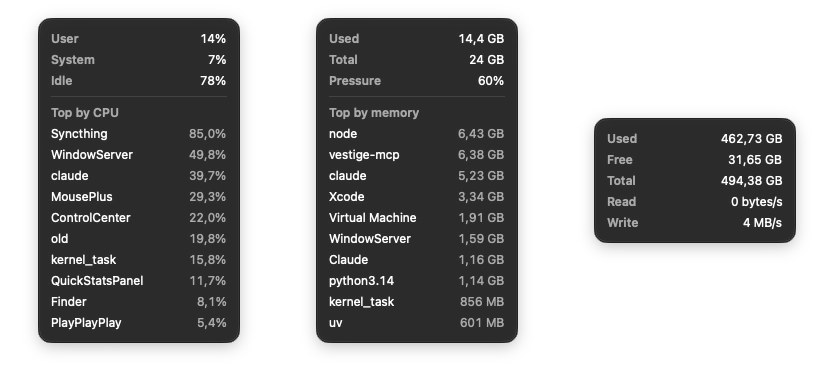
Show CPU, memory, disk, network and other readings beside your cursor. Dismiss the panel when you are done.

Details & graphs
Click a reading for activity graphs, top processes or sensor details.
Your layout
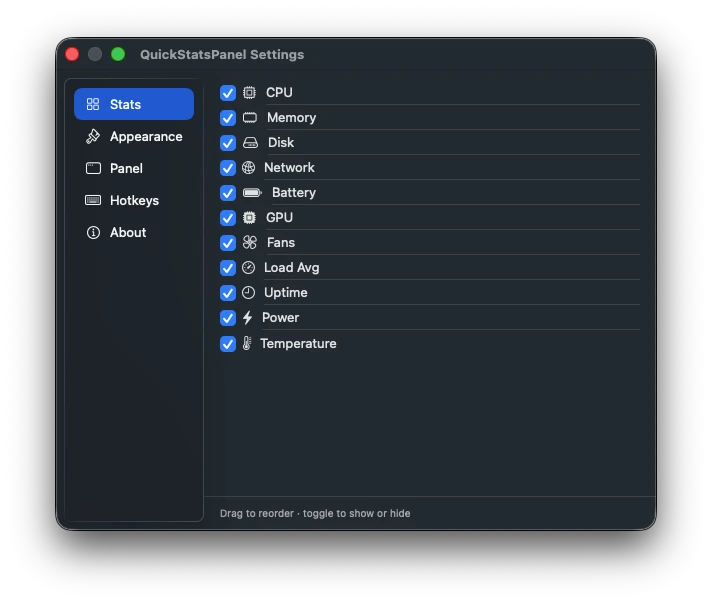
Choose and reorder readings, change the theme and customise hotkeys.
Hardware support
Available readings depend on your Mac. Power and temperature require Apple Silicon.
02 Views
03 Specifications
| Requirements | macOS 15 (Sequoia) or later. The Power and Temperature tiles need Apple silicon; on Intel Macs they step aside. |
| Readings | CPU, memory, disk, network, battery, GPU, fans, power, temperature, load average and uptime, where supported. |
| Summon it | ⌃⌥⌘Q shows or hides the strip, Esc or a click away dismisses it, ⌃⌥⌘P pins it. Every hotkey is rebindable. |
| Privacy | No egress, no analytics, no accounts. Readings are computed on-device from un-entitled system interfaces. Nothing leaves your Mac. |
| Released | October 3, 2026 · current v1.1.0 |
| Price | Free. Optional tip jar. |
| Source | View on GitHub ↗ |
| Permissions | No Accessibility, administrator or Full Disk Access permission required. |
Made by Luces Umbrarum. All apps ↗